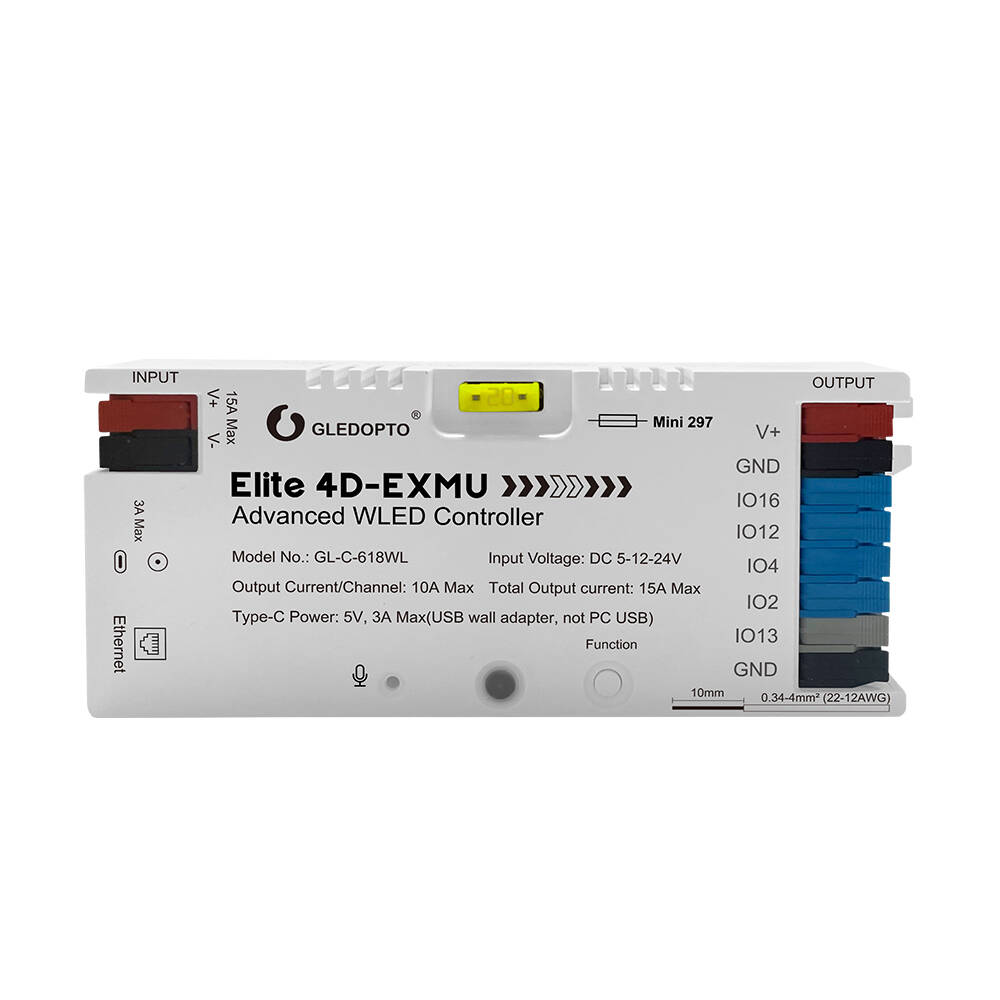
GL-C-618WL
Gledopto GL-C-618WL ESP32 WLED Ethernet Controller 4-Output with Mic
SG Seller, ships same/next day, Local Warranty
Buy on Shopee → ↓ Download installation manual (PDF)Overview
The GL-C-618WL "Elite 4D-EXMU" is an ESP32 WLED controller that uses wired Ethernet in place of WiFi. Its four independent digital outputs (IO16, IO12, IO4, IO2) each run a separate WLED segment at the same time. That suits multi-zone addressable installations such as media room bias lighting, staircase runs and architectural cove lighting, and any site with RF interference or a congested 2.4GHz band.
RJ45 Ethernet with an onboard crystal oscillator gives a stable, low-latency connection without the association timeouts, channel interference and mid-effect dropouts of WiFi. The built-in microphone enables AudioReactive WLED effects without external hardware. An energy-saving relay cuts strip power when WLED is off, reducing idle draw.
The Type-C port is dual-purpose: 5V/3A power input and UART firmware download, useful for flashing a custom WLED build without disassembly. Compare with the GL-C-620WL which provides one digital output plus two PWM outputs for mixed addressable and non-addressable installations.
Technical Specifications
| Model | GL-C-618WL (Elite 4D-EXMU Advanced WLED Controller) |
|---|---|
| Microcontroller | ESP32 |
| Connectivity | Ethernet (RJ45, crystal oscillator): no WiFi |
| Firmware | WLED (pre-installed, OTA updatable via web UI) |
| Input Voltage | DC 5V – 24V (constant voltage) |
| Total Output Current | 15A max |
| Per-Channel Output | 10A max |
| Digital Outputs | 4 channels (IO16, IO12, IO4, IO2) |
| Max ICs | ~3200 total across all 4 channels (WLED-configurable per segment) |
| Expansion Port | IO13 (GPIO 13, push switch / sensor input) |
| Type-C Port | 5V power input + UART download (dual purpose) |
| Fuse | 20A Mini 297 pluggable blade (field-replaceable) |
| Microphone | Built-in (AudioReactive usermod) |
| Wire Range | 0.34–4mm² (22–12AWG) |
| IP Rating | IP20 |
| Operating Temp | −20°C to +45°C |
WLED and Home Assistant Integration
Ships with WLED firmware pre-installed and ready to use. Access the WLED web interface by navigating to the controller's IP address on your local network. Control via the WLED web UI, the WLED iOS/Android app, or Home Assistant's native WLED integration: auto-discovery, no custom components or YAML configuration required.
MQTT is supported for integration into broader automation pipelines. E1.31 (sACN) and Art-Net DMX are supported for live entertainment and synchronised multi-controller setups.
OTA firmware updates: open the WLED web UI → Config → Security & Updates → OTA Update. For a custom WLED build or bleeding-edge firmware, connect via the Type-C UART port and flash using WLED_X.X.X_ESP32_Ethernet.bin: the Ethernet-specific build is required.
Supported addressable protocols: WS2812B, WS2813, WS2815, SK6812, WS2811, SM16703P, TM1814, and most single-wire addressable protocols supported by WLED.
Wiring: Addressable LED Strips (4 Digital Outputs)
V+ and V− are shared power inputs. Connect once from your DC PSU. Each of the four data channels connects independently to the DIN (data input) of its respective addressable strip. All strips share the common GND rail from the controller's V− terminal.
In WLED, configure each output channel as a separate segment (Config → LED Preferences → LED outputs). Assign GPIO pins IO16, IO12, IO4, and IO2 as individual outputs. Each segment can run different effects, colours, and brightness levels simultaneously.
Use a DC PSU rated at least 20% above your total strip load across all four channels. For strip runs over 2–3 metres, inject power directly at the strip rather than routing all current through the controller terminals. An Ethernet switch or router with a spare RJ45 port is required. The controller does not support WiFi.
FAQ
Does this need a Zigbee hub?
No. The GL-C-618WL runs WLED over wired Ethernet. No coordinator, bridge, or hub is required. Connect it directly to a network switch or router RJ45 port.
How is it different from the GL-C-620WL?
The GL-C-618WL has four digital outputs, all for addressable LED strips (WS2812B, SK6812, etc.). The GL-C-620WL has one digital output plus two PWM outputs, enabling mixed installations with both addressable and non-addressable (RGBCCT/CCT) strips running from a single controller.
Can I update the firmware?
Yes. OTA updates are available via the WLED web UI (Config → Security & Updates → OTA Update). For custom firmware builds, connect via the Type-C UART port and flash WLED_X.X.X_ESP32_Ethernet.bin: the Ethernet firmware variant is required for this controller.
What is the IO13 expansion port?
GPIO 13 is a digital input for push switches, door sensors, PIR sensors, and other hardware triggers. Inputs configured here are mapped directly to WLED button actions: trigger preset effects, toggle on/off, or cycle brightness without network involvement.