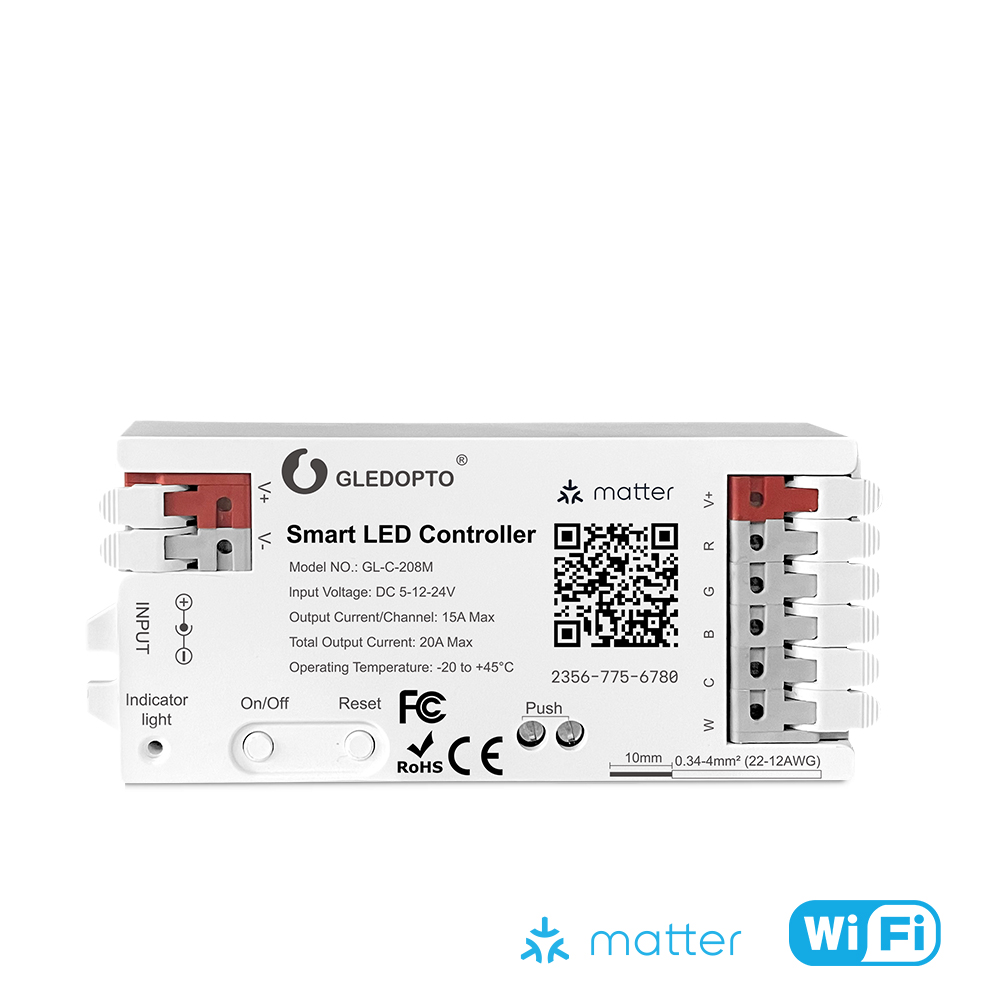
GL-C-208M
Gledopto GL-C-208M Matter WiFi RGB+CCT LED Controller 20A
SG Seller, ships same/next day, Local Warranty
Buy on Shopee → ↓ Download installation manual (PDF)Overview
Matter-over-WiFi LED strip controller for RGBCCT and RGBW installations. Pairs natively with Apple HomeKit, Amazon Alexa and Home Assistant, no proprietary bridge, coordinator, or hub required. 20A total output, 15A per channel, DC 5–24V constant voltage.
Gledopto markets it as an ACK (Alexa Connect Kit) controller. After commissioning, the GL-C-208M operates on your local network without cloud dependency, so automations and scenes keep working if your internet connection drops.
Unlike the Gledopto Zigbee range, it needs no Zigbee coordinator, only a 2.4GHz WiFi network and a Matter controller: Apple HomePod Mini, Apple TV 4K, Amazon Echo (4th gen or later), or Home Assistant with the Matter server integration. Any of these acts as the Matter controller.
Technical Specifications
| Model | GL-C-208M (ACK RGBCCT Smart LED Controller) |
|---|---|
| Protocol | Matter over WiFi (2.4GHz, 5GHz not supported) |
| Input Voltage | DC 5V – 24V (constant voltage) |
| Total Output Current | 20A max |
| Per-Channel Output | 15A max |
| Output Type | RGB + Dual White (RGBCCT, 5-channel) |
| Wire Range | 0.34–4mm² (22–12AWG) |
| IP Rating | IP20 |
| Operating Temp | −20°C to +45°C |
| Certifications | FCC, CE, RoHS |
Matter and Home Assistant Compatibility
Because it uses Matter over WiFi, the GL-C-208M is not tied to one ecosystem. Pair it directly with the Apple Home app, Amazon Alexa, or Home Assistant: the same physical device can be shared across multiple Matter controllers simultaneously.
In Home Assistant, add it via Settings → Devices & Services → Matter (requires the HA Matter server integration, available since HA 2022.12). It exposes as a standard light entity with full colour, colour temperature, and brightness control.
Local control: after commissioning, the GL-C-208M operates entirely on your local network. Matter's local control stack means automations, scenes, and direct app control do not require internet connectivity post-setup.
Important: 2.4GHz WiFi is required. 5GHz-only network configurations are not supported. Most home routers broadcast both bands simultaneously. During setup, ensure your phone or tablet is connected to the 2.4GHz SSID, or use a router with band steering to ensure the controller joins 2.4GHz.
Wiring: RGBCCT LED Strip (5-channel)
The terminal block provides one power input pair (V+/V−) and five output channels. For a standard 5-pin RGBCCT LED strip:
| Terminal | Connect to |
|---|---|
| V+ (input) | PSU positive (5V, 12V, or 24V DC) |
| V− (input) | PSU negative / ground |
| R | Strip red wire |
| G | Strip green wire |
| B | Strip blue wire |
| W1 / CW | Strip cool white wire |
| W2 / WW | Strip warm white wire |
Use a constant-voltage DC PSU rated at least 20% above your total strip load. Do not exceed 20A total or 15A on any single channel.
FAQ
Do I need a Zigbee hub?
No. The GL-C-208M uses Matter over WiFi and pairs directly with Apple Home, Amazon Alexa or Home Assistant without any coordinator, bridge, or hub. A Matter controller (e.g. HomePod Mini, Echo 4th gen, or HA Matter server) is required.
Does it work without internet after setup?
Yes. Matter supports local control. After initial commissioning, the GL-C-208M operates on your local network and does not require a live internet connection for automations or direct control via your Matter controller.
Can it run RGB and white channels simultaneously?
Yes. The dual white channels (CW and WW) operate independently from the RGB channels. All five are active simultaneously in RGBCCT mode, so you can set a colour temperature on the white channels while the RGB channels output a separate colour.
Does it work on 5GHz WiFi?
No. This controller connects on 2.4GHz WiFi only. Most home routers broadcast both 2.4GHz and 5GHz bands simultaneously, so this is rarely a practical limitation. Ensure your setup device is on the 2.4GHz band during the commissioning process.